


How to set up your ecommerce automations for Shopify
E-commerce automations allow you to send the right message to your customers at the right time without needing to send campaigns manually. By connecting your Shopify store to Mail Blaze, you can trigger emails automatically based on customer actions such as placing an order, registering an account, or abandoning a cart.
These automations help you improve customer experience, increase conversions, and keep your audience engaged throughout the entire shopping journey.
To get started, log in to your Mail Blaze account and then click on the AUTOMATIONS tab in the main navigation, then click on CREATE NEW.

Give your automation a name and select the appropriate E-commerce trigger and conditions.
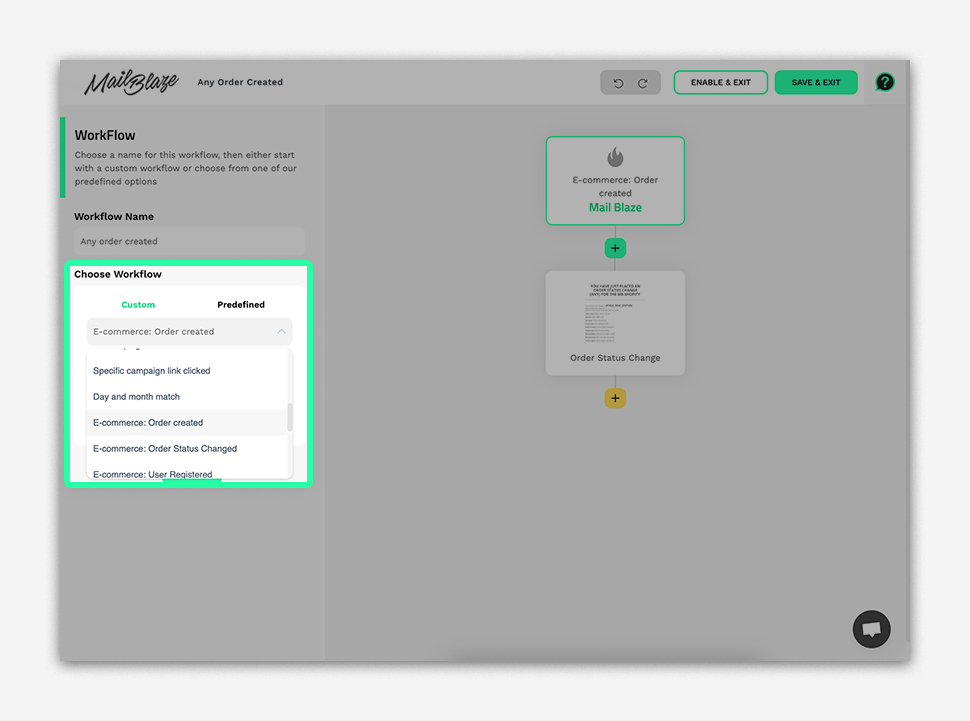
The specific E-commerce triggers and conditions available for Shopify are as follows:
| CATEGORY | TRIGGERS | CONDITIONS | PRIMARY PURPOSE |
|---|---|---|---|
| Order Management | Order Created | Any order created Total amount Currency code Payment Method |
Post-purchase communication and order lifecycle management |
| Order Status Changed | Any Status Change Status Was Status Now Status From To Total Amount |
||
| Customer Registration & Engagement | User Registered* | N/A | New customer onboarding and list building |
| User Opt-In | N/A | ||
| Shopping Cart | Cart Abandoned | Any Abandoned Cart Total amount Cart Items |
Purchase completion and conversion optimisation |
*Please note a customer must consent to be opted-in to marketing material, otherwise, they will be added to your list in an unconfirmed state
Triggers and Possible Use Cases:
Order Management Triggers
| CATEGORY | TRIGGERS | CONDITIONS | PRIMARY PURPOSE |
|---|---|---|---|
| Order Management | Order Created | Any order created Total amount Currency code Payment Method |
Post-purchase communication and order lifecycle management |
| Order Status Changed | Any Status Change Status Was Status Now Status From To Total Amount |
E-COMMERCE: ORDER CREATED
When selecting this trigger a subscriber will be added to this workflow immediately after successfully completing a purchase and an order is generated in your system. You can use this trigger in combination with conditions to create a streamlined journey for your customers.
TOP TIPS: Make sure you’re sending any automations related to order created in a timely fashion to provide immediate information and build customer confidence.
EMAIL AUTOMATION EXAMPLES AND IDEAS:
Immediate Order Confirmation
- Order summary with itemised details
- Payment confirmation and receipt
- Estimated delivery timeline
- Order tracking setup instructions
- Customer service contact information
Thank You & What's Next
- Personalised thank you message
- Preparation and shipping timeline
- Care instructions or setup guides
- Social media sharing encouragement
- Loyalty program enrollment invitation
Cross-sell Follow-up
- Complementary product recommendations
- Bundle offers at discounted rates
- Customer reviews and testimonials
- First-time buyer exclusive offers
E-COMMERCE: ORDER STATUS CHANGED
When selecting this trigger you’ll be able to use conditions to customise the flow of emails based on the customer's order status such as shipped, delivered, processing, cancelled, refunded, etc.
EMAIL AUTOMATION EXAMPLES AND IDEAS:
Order Processing (when status = "PROCESSING")
- Confirmation that order is being prepared
- Estimated preparation time
- Inventory updates if applicable
- Contact information for questions
- Upsell opportunities for future orders
Order Shipped (when status = "SHIPPED")
- Shipping confirmation with tracking number
- Carrier information and delivery timeline
- Package tracking instructions
- Delivery preparation tips
- Return policy reminder
Order Delivered (when status = "DELIVERED")
- Delivery confirmation message
- Product usage tips or setup guides
- Review request with incentive
- Social sharing encouragement
- Next purchase recommendations
Order Delayed (when status = "DELAYED")
- Sincere apology for the delay
- Updated delivery timeline
- Compensation offer (discount/free shipping)
- Alternative product suggestions
- Direct customer service contact
Order Cancelled/Refunded (when status = "CANCELLED")
- Cancellation confirmation
- Refund processing timeline
- Reason for cancellation (if applicable)
- Alternative product suggestions
- Re-engagement incentive for future purchases
Customer Registration & Engagement Triggers
| CATEGORY | TRIGGERS | CONDITIONS | PRIMARY PURPOSE |
|---|---|---|---|
| Customer Registration & Engagement | User Registered | N/A | New customer onboarding and list building |
| User Opt-in | N/A |
E-COMMERCE: USER REGISTERED
This trigger is used when you want to set up a series of emails once a customer has registered an account on your website.
TOP TIPS: When creating automations using this trigger it’s a great idea to focus on emails that welcomes new users, tells them more about your brand and encourages them to make a first purchase. Ensure you include trust cues and use evergreen content when creating these automations.
EMAIL AUTOMATION EXAMPLES AND IDEAS:
Welcome Email
- Warm welcome message with brand personality
- Account confirmation and setup completion
- First-purchase discount code (10-20% off)
- Navigation guide for the website
- Customer service and support information
Brand Story & Values
- Company history and mission
- What makes your products unique
- Customer testimonials and success stories
- Social media and community links
- Behind-the-scenes content
Product Catalog Introduction
- Best-selling products showcase
- Category-based product recommendations
- Size guides and product selection tips
- Customer favorites and trending items
- Exclusive member-only products
How-to & Tips
- Product usage tips and tutorials
- Style guides or pairing suggestions
- Care and maintenance instructions
- Video content and demonstrations
- User-generated content examples
Special Offers
- Limited-time new customer promotion
- Bundle deals and package savings
- Free shipping threshold information
- Loyalty program enrollment
- Referral program introduction
E-COMMERCE: USER OPT-IN
This trigger is created when a customer subscribes to your email list or marketing communications.
TOP TIP: Immediately confirm their subscription and set clear expectations about email frequency and content type. This ensures less drop-off on your list further down the line.
EMAIL AUTOMATION EXAMPLES AND IDEAS:
- Subscription Confirmation
- Double opt-in confirmation if required
- Thank you for subscribing message
- Subscription preferences and frequency
- Immediate subscriber-only discount
- Unsubscribe and preference management links
Welcome to Our Community
- Introduction to email content types
- What to expect and when
- Exclusive subscriber benefits overview
- Social media community invitation
- Customer testimonials about email value
First Exclusive Offer
- Subscriber-only discount code
- Early access to sales and promotions
- Free shipping offer
- Bundle deals exclusive to subscribers
- Limited-time flash sale notification
Content Preferences Setup
- Email frequency options
- Content category preferences
- Product interest segmentation
- Birthday and anniversary date collection
- Communication channel preferences
Shopping Cart Triggers
| CATEGORY | TRIGGERS | CONDITIONS | PRIMARY PURPOSE |
|---|---|---|---|
| Shopping Cart | Cart Abandoned | Any Abandoned Cart Total amount Cart Items | Purchase completion and conversion optimisation |
E-COMMERCE: CART ABANDONED
When a customer leaves items in their cart without completing the purchase for a specified period of time.
TOP TIP: You can send a once-off email or a gentle reminder and possible incentives to get the customers from consideration to purchase.
EMAIL AUTOMATION EXAMPLES AND IDEAS:
Gentle Reminder
- Friendly "you forgot something" message
- Cart contents with product images
- One-click return to checkout
- Customer testimonials for cart items
- No pressure, helpful tone
Value Reinforcement
- Benefits and features of cart items
- Customer reviews and ratings
- Free shipping and return policies
- Security and payment assurances
- Customer service contact information
Incentive Offer
- Limited-time discount (10-15% off)
- Free shipping offer
- Buy now, pay later options
- Express checkout reminder
- Alternative payment methods
Final Attempt
- Last chance messaging
- Stronger discount (15-20% off)
- Scarcity messaging (limited stock)
- Alternative product suggestions
- Invitation to browse other categories
Re-engagement
- General brand newsletter subscription
- New arrivals and trending products
- Educational content and tips
- Brand story and values
- No direct sales pitch
If you have any questions about your E-commerce automations for Shopify, kindly reach out to us via chat or email at support@mailblaze.com.